Arca
Arca
Scroll
Role
Role
Role
UX Design, Research
UX Design, Research
UX Design, Research
Category
Category
Category
Directed Research
Directed Research
Directed Research
Year
Year
Year
2025
2025
2025
Tool Credits
Tool Credits
Tool Credits
Figma, Figmake, Vizcom (video render)
Figma, Figmake, Vizcom (video render)
Figma, Figmake, Vizcom (video render)
Services
Services
Brand Identity
Brand Identity
Web Design
Brand Identity
Web Design
Info
Info
Info
Arca is a system that helps people understand and trust smart sensing devices like cameras, microphones, and connected sensors. As these devices become more common, Arca sets a clear standard for transparency and responsible use. Showing what these devices are sensing, how they’re working, and gives people real control over their privacy through clear indicators, verified status information, and adjustable preferable sensing modes.
Arca is a system that helps people understand and trust smart sensing devices like cameras, microphones, and connected sensors. As these devices become more common, Arca sets a clear standard for transparency and responsible use. Showing what these devices are sensing, how they’re working, and gives people real control over their privacy through clear indicators, verified status information, and adjustable preferable sensing modes.
Arca is a system that helps people understand and trust smart sensing devices like cameras, microphones, and connected sensors. As these devices become more common, Arca sets a clear standard for transparency and responsible use. Showing what these devices are sensing, how they’re working, and gives people real control over their privacy through clear indicators, verified status information, and adjustable preferable sensing modes.
Role
UX Design, Research
Category
Directed Research
Year
2025
Tool Credits
Figma, Figmake, Vizcom (video render)
Context
Arca is a system that helps people understand and trust smart sensing devices like cameras, microphones, and connected sensors. As these devices become more common, Arca sets a clear standard for transparency and responsible use. Showing what these devices are sensing, how they’re working, and gives people real control over their privacy through clear indicators, verified status information, and adjustable preferable sensing modes.
Owner in-app setup

Adjacent user

Owner in-app setup
← Swipe to explore →
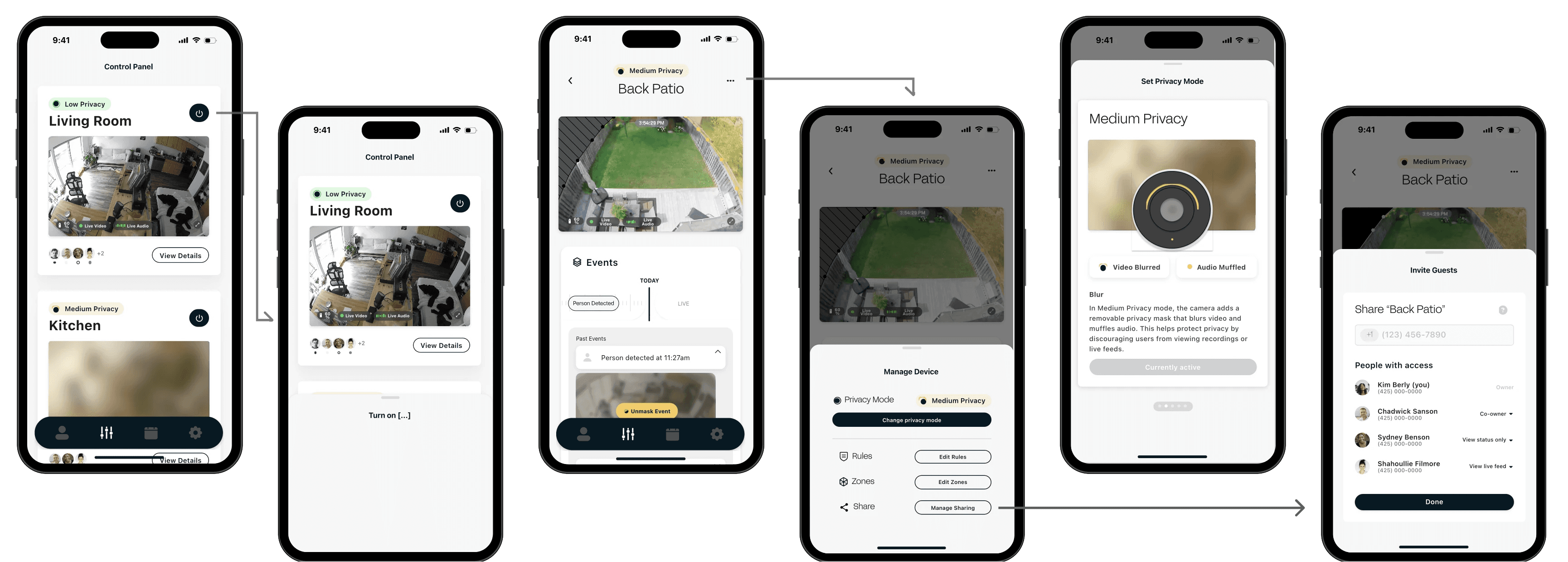
Adjacent user
← Swipe to explore →
Process
The Challenge
Process
Process
Process
Developing Arca introduced a series of complex design and implementation challenges:
1. Extending Arca
How could Arca scale across diverse sensing modalities, microphones, proximity sensors, and environmental monitors? Which requires a unified framework for communicating sensing intent, range, and state.
2. Making transparency truly clear
How to present sensing activity, when a device is fully on, medium state, strong state, or fully off. Exploring these combinations of physical indicators, overlays, and interfaces to ensure users could trust what they see and understand what’s being sensed. Maintaining trust without compromising protection.
3. Designing for shared environments
Many sensing devices operate in shared spaces where multiple users or bystanders may be affected. Incorporating shared settings meant designing mechanisms that respect different comfort levels and permissions.
Developing Arca introduced a series of complex design and implementation challenges:
1. Extending Arca
How could Arca scale across diverse sensing modalities, microphones, proximity sensors, environmental monitors? Which requires a unified framework for communicating sensing intent, range, and state.
2. Making transparency truly clear
How to present sensing activity, when a device is fully on, medium state, strong state, or fully off. Exploring these combinations of physical indicators, overlays, and interfaces to ensure users could trust what they see and understand what’s being sensed.
3. Designing for shared environments
Many sensing devices operate in shared spaces where multiple users or bystanders may be affected. Incorporating shared settings meant designing mechanisms that respect different comfort levels.
Developing Arca introduced a series of complex design and implementation challenges:
1. Extending Arca
How could Arca scale across diverse sensing modalities, microphones, proximity sensors, environmental monitors? Which requires a unified framework for communicating sensing intent, range, and state.
2. Making transparency truly clear
How to present sensing activity, when a device is fully on, medium state, strong state, or fully off. Exploring these combinations of physical indicators, overlays, and interfaces to ensure users could trust what they see and understand what’s being sensed.
3. Designing for shared environments
Many sensing devices operate in shared spaces where multiple users or bystanders may be affected. Incorporating shared settings meant designing mechanisms that respect different comfort levels.
Scenario 1: Airbnb Host


Scenario 1: Airbnb Host
Mapping of property and what selected areas are set under (medium or strong privacy states)
Select/ blacklist specific areas
3D Mapping or Live View when selecting sensitive areas?
Scenario 1: Airbnb Host

Mapping of property and what selected areas are set under (medium or strong privacy states)
Select/ blacklist specific areas
3D Mapping or Live View when selecting sensitive areas
Scenario 2: Aging Parent

Hey Arca.
Calling Kiana
Granting Kiana
Full Access


Default - Medium Privacy
Emergency: Allow to switch adult child’s access to fully (true) on?
“Hey Arca” can be triggered through:
Voice, Motion detection
Noise detection
(if outside normal range)
If aging parent has phone on them, can also touch the “Hey Arca” button
Solution
Expanding Opportunities
01
Modular Architecture (Consent/Rule)
To address the scalability issue, we developed a modular system that allows for seamless integration of various sensing modalities. To ensure that each device communicates its unique capabilities while still aligning with a central communication protocol, enhancing overall system coherence.
Host Perspective
Guest Perspective

02
User-centric Interface (States/Indicators)
To enhance transparency, we created an intuitive user interface that visually represents the sensing states through color codes, icons, and animations. This allows users to easily comprehend the operational status of devices, fostering a greater sense of trust and understanding.
Guidelines
Medium Privacy
Privacy Level Changes
Privacy levels are locked for the duration of your stay. However, if the privacy level changes, all parties will be notified.
What Guests Can See
Field of View Preview
Guests are allowed a five second sample of the camera’s video feed to check the area within field of view and the audio recording status.

What Hosts Can See
Events Center
•
Detected activity by the camera is recorded and logged in the events center for review by hosts.
•
If an emergency situation or unusual activity is detected, the host will be notified.

Video and Audio Example
Below are examples of what hosts can see and hear in this privacy mode.
Masked
After Unmasking


60%
Video Masked
Audio Masked
Privacy States Guide
SensesMark cameras have lights that indicate what state it's in:
Microphone: A small light near the microphone
Camera: A large light ring around camera lens
When you see one of the indicator patterns below, it means the device is in the specified mode.
SenseMark devices cannot lie about their state or disable the indicator lights. While rare, it is possible that some may tamper with a light, such as by physically covering it.
True On

Camera and microphone are on and recording.
More Information
Medium Privacy

Masked video and audio, camera and microphone are recording.
More Information
Strong Privacy

Camera and microphone are offline, only detects emergency situations.*
More Information
True Off

Camera and Microphone are fully off and are not recording.
More Information
Privacy States Guide
SensesMark cameras have lights that indicate what state it's in:
Microphone: A small light near the microphone
Camera: A large light ring around camera lens
When you see one of the indicator patterns below, it means the device is in the specified mode.
SenseMark devices cannot lie about their state or disable the indicator lights. While rare, it is possible that some may tamper with a light, such as by physically covering it.
True On

Camera and microphone are both recording.
More Information
Medium Privacy

Masked video and audio, camera and microphone are recording.
More Information
Indicator Status
Camera is on
Video recording is on and masked.
Microphone is on
Audio recording is on and not masked.
Camera Lens Masked
There is no physical mask or blocker on the camera lens.
Strong Privacy

Camera and microphone are offline, only detects emergency situations.*
More Information
True Off

Camera and Microphone are fully off and are not recording.
More Information
Find Device

03
Collaborative Design (Invite/Share)
Analyzed and researched potential users in shared environments to gather insights and preferences regarding privacy and interaction. This feedback shaped the design of adaptive features that allow users to customize their experience, ensuring that all voices are respected within these shared spaces.
Events
TODAY
Past Events
Person detected at 11:27am

Unmask Event
Animal detected at 11:27am
Door opening at 11:26am
Person detected at 11:22am
Person detected at 11:27am
Animal detected at 11:27am
Door opening at 11:26am
Person detected at 11:22am
Person detected at 11:27am
Animal detected at 11:27am
Door opening at 11:26am
Person detected at 11:22am
9:41
Medium Privacy
Back Patio


60%
Live Video
Live Audio
Share “Back Patio”
+1
(123) 456-7890
People with access

Kim Berly (you)
(425) 000-0000
Owner

Chadwick Sanson
(425) 000-0000
Co-owner

Sydney Benson
(425) 000-0000
View status only

Shahoullie Filmore
(425) 000-0000
View live feed
Done
9:41
Medium Privacy
Back Patio
Live Feed


60%
Live Video
Live Audio
Set Privacy Zones
Sharing
Share “Back Patio”
+1
(425) 123-1234
Permissions
View status
Grants access to the device’s status + a snapshot from the video feed.
Access live feed
Grants access to the live feed (depends on the device’s current privacy mode).
Limited privacy controls
Allows the user to set the device’s privacy mode to Medium Privacy (if set to Low Privacy).
Co-owner
Grants full permissions to this camera, including full privacy controls + the ability to share with other guests.
Send
9:41
Medium Privacy
Back Patio
Live Feed
60%
Live Video
Live Audio
Set Privacy Zones
Sharing
Update “Back Patio”

Chadwick Sanson

Sydney Benson
Permissions
View status
Grants access to the device’s status + a snapshot from the video feed.
Access live feed
Grants access to the live feed (depends on the device’s current privacy mode).
Limited privacy controls
Allows the user to set the device’s privacy mode to Medium Privacy (if set to Low Privacy).
Co-owner
Grants full permissions to this camera, including full privacy controls + the ability to share with other guests.
Save
Mapping of property and what selected areas are set under (medium or strong privacy states)
Mapping of property and what selected areas are set under (medium or strong privacy states)
Select/ blacklist specific areas
Select/ blacklist specific areas
3D Mapping or Live View when selecting sensitive areas
3D Mapping or Live View when selecting sensitive areas
Scenario 2: Aging Parent
Scenario 2: Aging Parent
Scenario 2: Aging Parent

Hey Arca.
Calling Kiana
Granting Kiana
Full Access

Hey Arca.
Calling Kiana
Granting Kiana
Full Access
Default - Medium Privacy
Default - Medium Privacy
Default - Medium Privacy
Emergency: Allow to switch adult child’s access to fully (true) on?
Emergency: Allow to switch adult child’s access to fully (true) on?
Emergency: Allow to switch adult child’s access to fully (true) on?
“Hey Arca” can be triggered through:
Voice
Motion detection
Noise detection
“Hey Arca” can be triggered through:
Voice
Motion detection
Noise detection
“Hey Arca” can be triggered through:
Voice
Motion detection
Noise detection
Solution
Solution
Solution
Expanding Opportunities
Expanding Opportunities
Expanding Opportunities
01
01
01
Modular Architecture (Consent/Rule)
Modular Architecture (Consent/Rule)
Modular Architecture (Consent/Rule)
To address the scalability issue, we developed a modular system that allows for seamless integration of various sensing modalities. To ensure that each device communicates its unique capabilities while still aligning with a central communication protocol, enhancing overall system coherence.
To address the scalability issue, we developed a modular system that allows for seamless integration of various sensing modalities. To ensure that each device communicates its unique capabilities while still aligning with a central communication protocol, enhancing overall system coherence.
To address the scalability issue, we developed a modular system that allows for seamless integration of various sensing modalities. To ensure that each device communicates its unique capabilities while still aligning with a central communication protocol, enhancing overall system coherence.
Host Perspective
Host Perspective
Privacy Mode
Choose the starting privacy level for this stay.
No Privacy
Medium Privacy
Adds a removable privacy mask that blurs video and muffles audio. This helps protect privacy by discouraging users from viewing recordings or live feeds.
Recommended
Off
Strong Privacy
Guests will be notified if privacy mode changes during their stay.
Trigger Events
Select the events Arca can respond to.
Unusual activity
Multiple People
Animal
Loud Noise
Emergencies
Break In
Flooding
Fire
Arca may temporarily lower privacy to verify detected events.
No Privacy
Arca has entered Low Privacy Mode to verify check-out and cleaning.
Thank you for hosting.
Check-Out Complete
Guest Perspective
Guest Perspective
Privacy Overview
This property uses Arca in Medium Privacy Mode.
Medium Privacy
Arca may temporarily change modes if it detects an emergency or rule violation:
Multiple People
Loud Noise
Break In
I understand that I will be notified if privacy mode changes.
Privacy Mode Changed
Due to unusual activity, the privacy mode has changed.
Medium Privacy
→
No Privacy
Arca detected these unusual activity from [time] to [time]:
Multiple people detected
View Details
You will always be notified when privacy mode changes.
No Privacy
Arca has entered Low Privacy Mode to verify check-out and cleaning.
Thank you for your stay.
Check-Out Complete
02
02
02
User-centric Interface (States/Indicators)
User-centric Interface (States/Indicators)
User-centric Interface (States/Indicators)
To enhance transparency, we created an intuitive user interface that visually represents the sensing states through color codes, icons, and animations. This allows users to easily comprehend the operational status of devices, fostering a greater sense of trust and understanding.
To enhance transparency, we created an intuitive user interface that visually represents the sensing states through color codes, icons, and animations. This allows users to easily comprehend the operational status of devices, fostering a greater sense of trust and understanding.
To enhance transparency, we created an intuitive user interface that visually represents the sensing states through color codes, icons, and animations. This allows users to easily comprehend the operational status of devices, fostering a greater sense of trust and understanding.
Guidelines
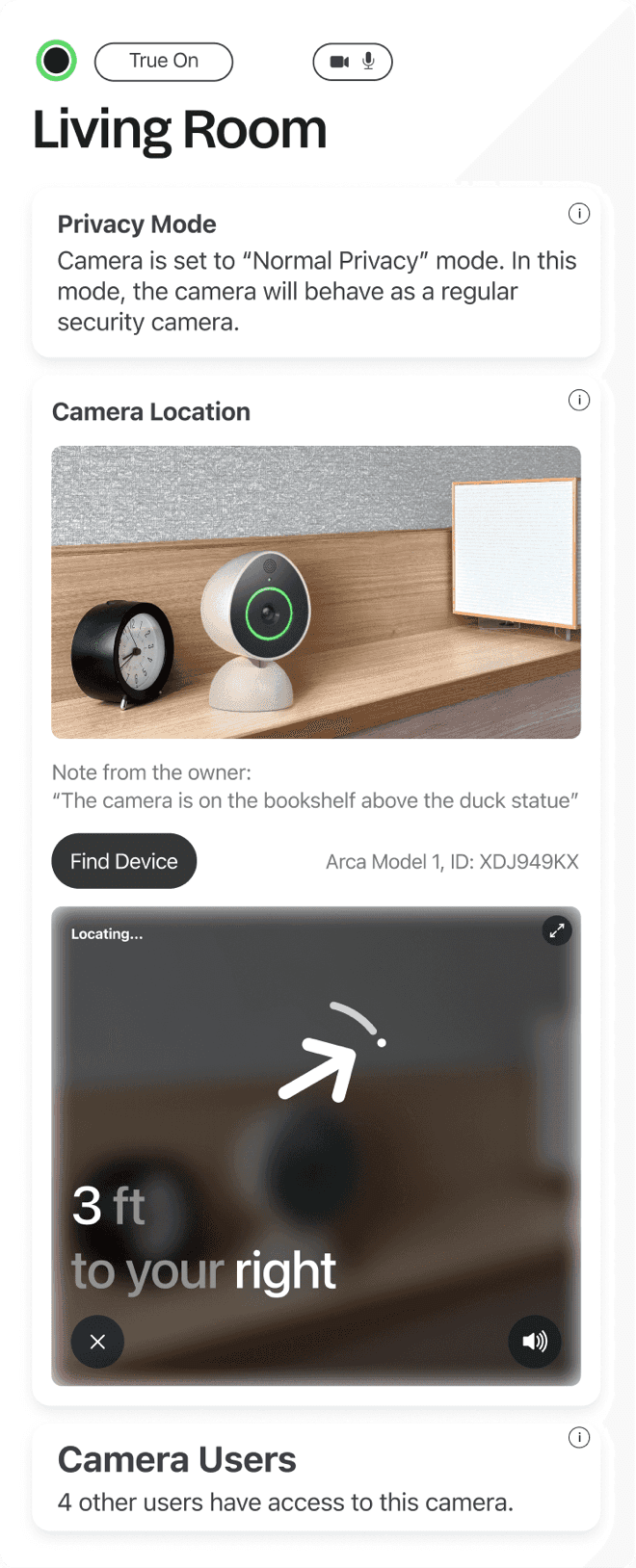
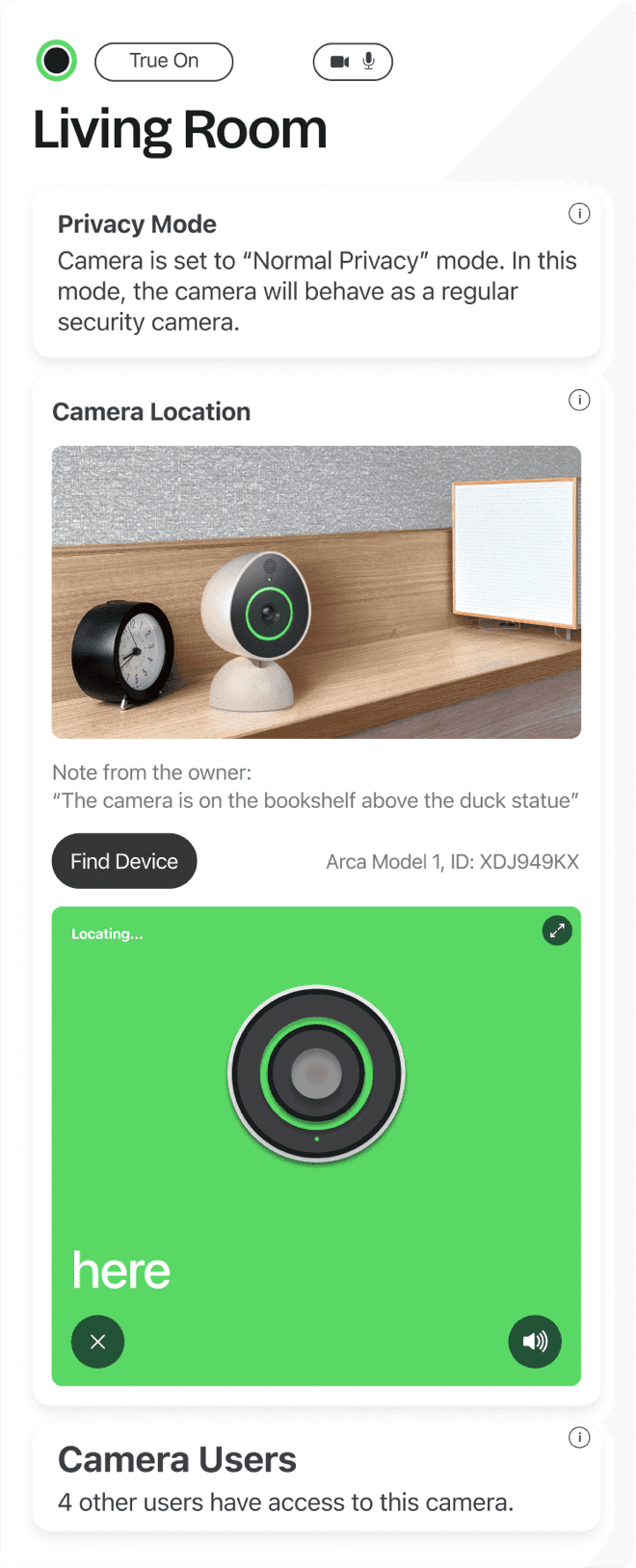
Find Device
Privacy States Guide
SensesMark cameras have indicators for what state it's in:
Microphone: Small light near the microphone
Camera: Large light ring around camera lens
When you see one of the indicator patterns below, it means the device is in the specified mode.
SenseMark devices cannot lie about their state or disable indicator lights. While rare, it is possible that some may tamper, such as by physically covering it.
True On
Camera and microphone are on and recording.
More Information
Medium Privacy
Masked video and audio, camera and microphone are recording.
More Information
Strong Privacy
Camera and microphone are offline, only detects emergency situations.*
More Information
True Off
Camera and Microphone are fully off and are not recording.
More Information

03
03
03
Collaborative Design (Invite/share)
Collaborative Design (Invite/share)
Collaborative Design (Invite/share)
Analyzed and researched potential users in shared environments to gather insights and preferences regarding privacy and interaction. This feedback shaped the design of adaptive features that allow users to customize their experience, ensuring that all voices are respected within these shared spaces.
Analyzed and researched potential users in shared environments to gather insights and preferences regarding privacy and interaction. This feedback shaped the design of adaptive features that allow users to customize their experience, ensuring that all voices are respected within these shared spaces.
Analyzed and researched potential users in shared environments to gather insights and preferences regarding privacy and interaction. This feedback shaped the design of adaptive features that allow users to customize their experience, ensuring that all voices are respected within these shared spaces.
Events
TODAY
Past Events
Person detected at 11:27am
Unmask Event
Animal detected at 11:27am
Door opening at 11:26am
Person detected at 11:22am
Person detected at 11:27am
Animal detected at 11:27am
Door opening at 11:26am
Person detected at 11:22am
Person detected at 11:27am
Animal detected at 11:27am
Door opening at 11:26am
Person detected at 11:22am
9:41
Medium Privacy
Back Patio
60%
Live Video
Live Audio
Share “Back Patio”
+1
(123) 456-7890
People with access
Kim Berly (you)
(425) 000-0000
Owner
Chadwick Sanson
(425) 000-0000
Co-owner
Sydney Benson
(425) 000-0000
View status only
Shahoullie Filmore
(425) 000-0000
View live feed
Done
9:41
Medium Privacy
Back Patio
Live Feed
60%
Live Video
Live Audio
Set Privacy Zones
Sharing
Share “Back Patio”
+1
(425) 123-1234
Permissions
View status
Grants access to the device’s status + a snapshot from the video feed.
Access live feed
Grants access to the live feed (depends on the device’s current privacy mode).
Limited privacy controls
Allows the user to set the device’s privacy mode to Medium Privacy (if set to Low Privacy).
Co-owner
Grants full permissions to this camera, including full privacy controls + the ability to share with other guests.
Send