| Context
| Context
The Modern "Do Not Disturb" Dilemma
The Modern "Do Not Disturb" Dilemma
"Do Not Disturb" offers peace, but at a cost: the gradual erosion of belonging. When re-entering the community, we often feel lost and overwhelmed by the missed and lost context.
In active Discord communities, members struggle with staying informed and connected–either feeling glued to servers or returning to overwhelming amounts of noise after being away.
"Do Not Disturb" offers peace, but at a cost: the gradual erosion of belonging. When re-entering the community, we often feel lost and overwhelmed by the missed and lost context.
In active Discord communities, members struggle with staying informed and connected–either feeling glued to servers or returning to overwhelming amounts of noise after being away.
| Re-Design Motivation
| Re-Design Motivation
Discord for EVERYONE
Discord for EVERYONE
Although Discord has grown beyond its gaming roots, its current taxonomy, interface, and user flows remain optimized for tech-savvy users.
As of now, Discord doesn’t translate the organizational complexity into user friendly workflows. Creating friction for broader audiences (low-confident users).
Although Discord has grown beyond its gaming roots, its current taxonomy, interface, and user flows remain optimized for tech-savvy users.
As of now, Discord doesn’t translate the organizational complexity into user friendly workflows. Creating friction for broader audiences (low-confident users).
Team
Meiyao Li
Ruby Wu
Yaya Zheng
Instructors
Bridget Weis
Li -Yuan Chiou
Roles
UX Design
Research
Storyboarding
Prototyping
Tools
Figma
Procreate
Team
Meiyao Li
Ruby Wu
Yaya Zheng
Instructors
Bridget Weis
Li -Yuan Chiou
Roles
UX Design
Research
Storyboarding
Prototyping
Tools
Figma
Procreate
We learned that when users return to Discord , they encounter a frustrating mix of challenges that hinder re-engagement. The volume of unfiltered messages creates overload and disorientation, making it difficult catching up without feeling buried in distracting content.
Emotionally, feeling disconnected or guilty for being absent, which can make returning to the community feel awkward or unwelcoming.
Together, these issues highlight a need for better message management, distraction reduction, and tools that better help users.
We learned that when users return to Discord , they encounter a frustrating mix of challenges that hinder re-engagement. The volume of unfiltered messages creates overload and disorientation, making it difficult catching up without feeling buried in distracting content.
Emotionally, feeling disconnected or guilty for being absent, which can make returning to the community feel awkward or unwelcoming.
Together, these issues highlight a need for better message management, distraction reduction, and tools that better help users.
The Challenge
The Challenge
Team
Team
Meiyao Li
Ruby Wu
Yaya Zheng
Meiyao Li
Ruby Wu
Yaya Zheng
Roles
Roles
UX Design
Research
Storyboarding
Prototyping
Instructors
Instructors
Bridget Weis
Li -Yuan Chiou
Bridget Weis
Li -Yuan Chiou
Tools
Tools
Figma
Procreate
Figma
Procreate
"Do Not Disturb" offers peace, but at a cost: the gradual erosion of belonging. When re-entering the community, we often feel lost and overwhelmed by the missed and lost context.
In active Discord communities, members struggle with staying informed and connected–either feeling glued to servers or returning to overwhelming amounts of noise after being away.
| Context
The Modern "Do Not Disturb" Dilemma
Although Discord has grown beyond its gaming roots, its current taxonomy, interface, and user flows remain optimized for tech-savvy users.
As of now, Discord doesn’t translate the organizational complexity into user friendly workflows. Creating friction for broader audiences (low-confident users).
| Re-Design Motivation
Discord for EVERYONE
Users expressed interest in switching over to Slack. Offering similar content/functionality as Discord, however its features prioritize intuitive interaction, efficient notification management, and user empowerment.
Final Deliverable:
A Discord For All
Notification inbox re-designed to eliminate FOMO while honoring personal downtime.


Interest-based notification settings

Catch-up cards — high level
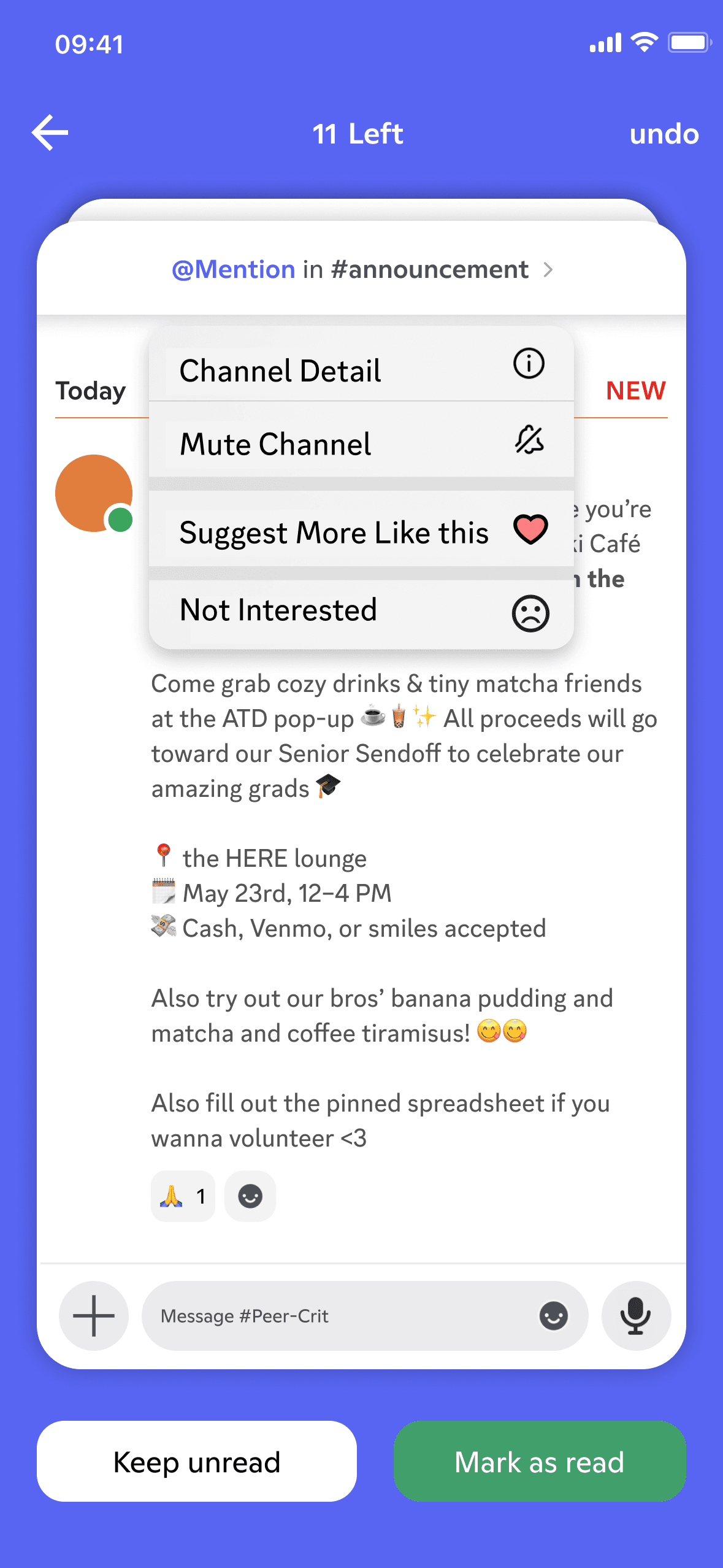
Catch-up cards — low level

Archive & Reminders

Personal library of saved messages
Figma Prototype
We learned that when users return to Discord , they encounter a frustrating mix of challenges that hinder re-engagement. Volume of unfiltered messages creates overload and disorientation, making it difficult catching up without feeling buried in distracting content.
Emotionally, feeling disconnected or guilty for being absent, which can make returning to the community feel awkward or unwelcoming.
Together, these issues highlight a need for better message management, distraction reduction, and tools that better help users.
The Challenge
How might we empower non-technical users with more control over their notifications and reduce frictions such that catching-up community updates feels effortless?
How might we empower non-technical users with more control over their notifications and reduce frictions such that catching-up community updates feels effortless?
How might we empower non-technical users with more control over their notifications and reduce frictions such that catching-up community updates feels effortless?


Slack
| Competitive Analysis
Users expressed interest in switching over to Slack. Offering similar content/functionality as Discord, however its features prioritize intuitive interaction, efficient notification management, and user empowerment.
01) Intuitive Interaction
The immersive card swiping interface on slack mimics real-world gestures, removing unnecessary UI elements to reduce cognitive overload and improve information retention. Giving users flexibility through interactions, supporting different preferences and making available actions more recognizable.

02) Notification Management,
User Empowerment
Notifications can be easily filtered out by categories such as “All,” “@Mentions,” “Threads,”and “Reactions,” with an “Unread” toggle placed conveniently for users to quickly access.


Whereas….
Discord’s flexibility and customization come at the cost of user clarity and consistency, leading to significant frustration, especially for new members.


Visibility of System Status (Severity: 4)
Notifications are cluttered and lack clear sourcing. Users face limited control, missing essential features like categorical filtering, unread toggles, and the ability to archive or pin alerts.
Work Hard.
Work Hard.
Play Hard.
Play Hard.
Discord Notification and Inbox Re-Design
Discord Notification and Inbox Re-Design
March - June 2025
March - June 2025

Play Hard.
Discord Notification and Inbox Re-Design
March - June 2025
Work Hard.
Usability Testing
Usability Testing
Usability Testing
Usability Testing
Participants
Participants
Participants
Ariana - FINANCE CHAIR of DESIGN FRATERNITY
Ariana - FINANCE CHAIR of DESIGN FRATERNITY

I felt like I am “Trained to ignore notifications” from Discord
I felt like I am “Trained to ignore notifications” from Discord
“I left all the notifications on because I don’t want to miss any hangouts”
“I left all the notifications on because I don’t want to miss any hangouts”
Kristin - Professional Development Chair
Kristin - Professional Development Chair

After talking to ATD active members, one of the main concern is FOMO (fears of missing out). Both Ariana and Kristin don’t want to feel FOMO or miss any hangouts while they are away. So, they leave notifications on and overtime found themselves always checking and sometimes completely ignoring the notifications.
After talking to ATD active members, one of the main concern is FOMO (fears of missing out). Both Ariana and Kristin don’t want to feel FOMO or miss any hangouts while they are away. So, they leave notifications on and overtime found themselves always checking and sometimes completely ignoring the notifications.
Pain point 1: Social Pressure and FOMO
Pain point 1: Social Pressure and FOMO
Key messages often got buried under casual conversations, requiring users to rely on memory, endless scrolling, or disjointed tools. Pinned messages were inconsistent, and important resources frequently disappeared into the chat stream.
Key messages often got buried under casual conversations, requiring users to rely on memory, endless scrolling, or disjointed tools. Pinned messages were inconsistent and important resources frequently disappeared into the chats.
Pain point 2: Disorganized and Unretrievable Information
Pain point 2: Disorganized and Unretrievable Information
“I draft announcements based on 20+ DMs. I scroll, remember manually, and still miss stuff.”
“I draft announcements based on 20+ DMs. I scroll, remember manually, and still miss stuff.”

Li-shy - Vice President of DESIGN FRATERNITY
Li-shy - Vice President of DESIGN FRATERNITY
Henry - President of DESIGN FRATERNITY
Henry - President of DESIGN FRATERNITY

“Pinned messages are hard to find. I need something permanent.
“Pinned messages are hard to find. I need something permanent.
“I need to remember to reimburse someone while setting up a bank account.”
“I need to remember to reimburse someone while setting up a bank account.”

Ariana - FINANCE CHAIR of DESIGN FRATERNITY
Ariana - FINANCE CHAIR of DESIGN FRATERNITY
As a result,
these frustrations lead many users to disable notifications entirely, eroding trust in the system and causing them to miss important messages.
The overall experience of catching up in Discord becomes overwhelming, requiring users to manually click through every channel to determine message relevance.
As a result,
these frustrations lead many users to disable notifications entirely, eroding trust in the system and causing them to miss important messages.
The overall experience of catching up in Discord becomes overwhelming, requiring users to manually click through every channel to determine message relevance.
We interviewed three executive board members of ATD (Ariana, Henry, Kristin), a UW design fraternity, who interact with Discord for event coordination, professional development, and social bonding.
Additionally, we have two Slack users (Ariana, Bridget) who brings comparative insights and a power Discord user (Vivian) with 60+ servers who’d been using discord since 2018.
We interviewed three executive board members of ATD (Ariana, Henry, Kristin), a UW design fraternity, who interact with Discord for event coordination, professional development, and social bonding.
Additionally, we have two Slack users (Ariana, Bridget) who brings comparative insights and a power Discord user (Vivian) with 60+ servers who’d been using discord since 2018.
We interviewed three executive board members of ATD (Ariana, Henry, Kristin), a UW design fraternity, who interact with Discord for event coordination, professional development, and social bonding.
Additionally, we have two Slack users (Ariana, Bridget) who brings comparative insights and a power Discord user (Vivian) with 60+ servers who’d been using discord since 2018.
Ariana - FINANCE CHAIR of DESIGN FRATERNITY
I felt like I am “Trained to ignore notifications” from Discord
Key messages often got buried under casual conversations, requiring users to rely on memory, endless scrolling, or disjointed tools. Pinned messages were inconsistent, and important resources frequently disappeared into the chat stream.
Pain point 2: Disorganized and Unretrievable Information
“I draft announcements based on 20+ DMs. I scroll, remember manually, and still miss stuff.”
Li-shy - Vice President of DESIGN FRATERNITY
Henry - President of DESIGN FRATERNITY
“Pinned messages are hard to find. I need something permanent.
“I need to remember to reimburse someone while setting up a bank account.”
Ariana - FINANCE CHAIR of DESIGN FRATERNITY
“I left all the notifications on because I don’t want to miss any hangouts”
Kristin - Professional Development Chair
After talking to ATD active members, one of the main concern is FOMO (fears of missing out). Both Ariana and Kristin don’t want to feel FOMO or miss any hangouts while they are away. So, they leave notifications on and overtime found themselves always checking and sometimes completely ignoring the notifications.
Pain point 1: Social Pressure and FOMO
As a result,
these frustrations lead many users to disable notifications entirely, eroding trust in the system and causing them to miss important messages.
The overall experience of catching up in Discord becomes overwhelming, requiring users to manually click through every channel to determine message relevance.
Re-Design Solution
Re-Design Solution
Re-Design Solution
FLOW 1
FLOW 1
FLOW 1
Notification Inbox Repurpose
Notification Inbox Repurpose
Notification Inbox Repurpose
Repurpose the existing
Repurpose the existing
4 out 5 people we user tested reported they never used this tab before due to the confusing layout, irrelevant friend request, and ineffective filtering tags.
4 out 5 people we user tested reported they never used this tab before due to the confusing layout, irrelevant friend request, and ineffective filtering tags.
Borrowing Existing Information Structure:
Built on Discord’s existing structure by using user-created folders to organize notifications,
Borrowing Existing Information Structure:
Built on Discord’s existing structure by using user-created folders to organize notifications,
Interest-Based Notification
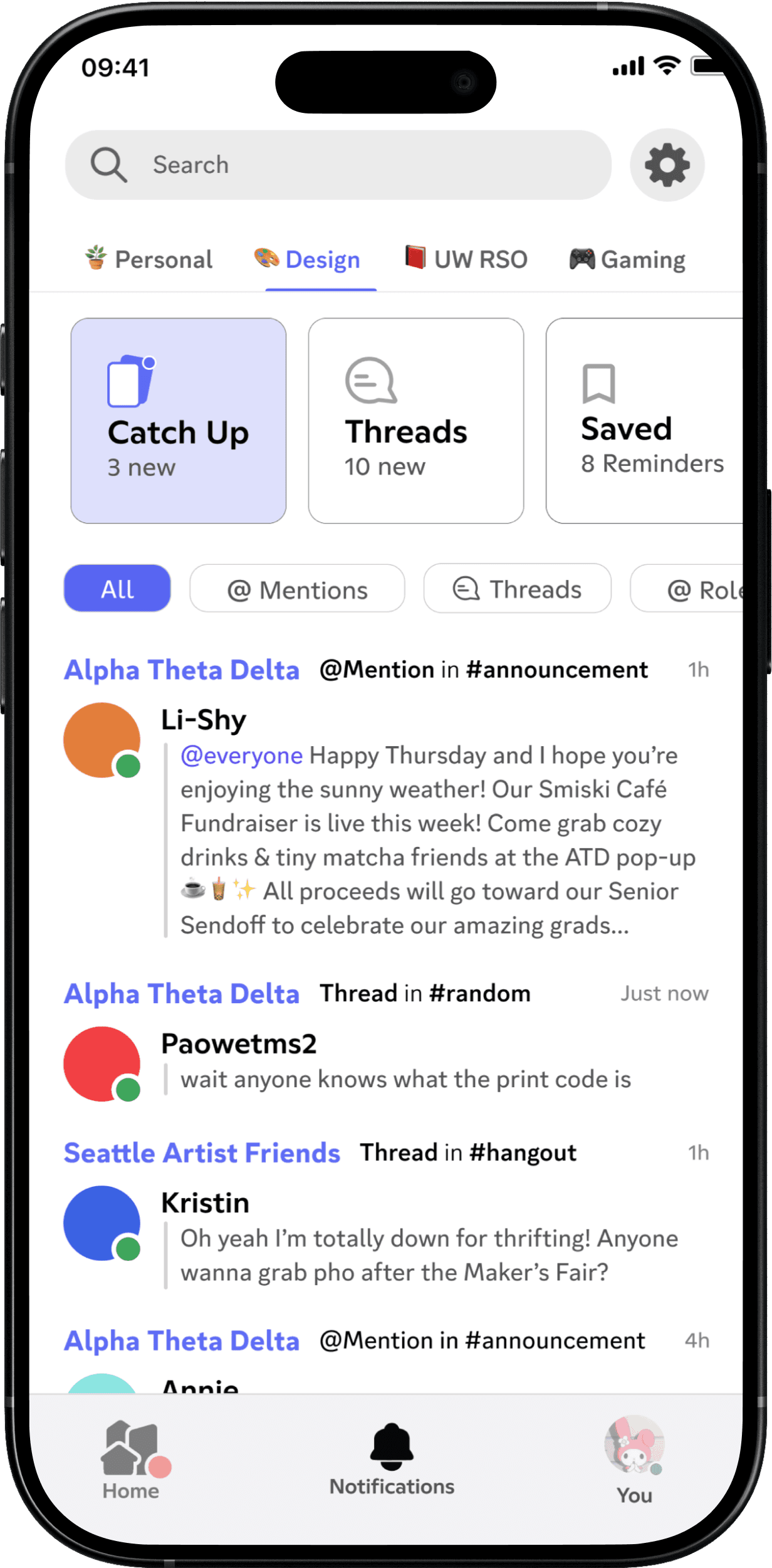
Our redesign replaces rigid navigation with an adaptive, interest-based filter, addressing complaints about irrelevant alerts and poor hierarchy.
Interest-Based Notification
Our redesign replaces rigid navigation with an adaptive, interest-based filter, addressing complaints about irrelevant alerts and poor hierarchy.
4 out 5 people we user tested reported they never used this tab before due to the confusing layout, irrelevant friend request, and ineffective filtering tags.
Borrowing Existing Information Structure:
We built on Discord’s existing structure by using user-created folders to organize notifications,
Interest-Based Notification
Our redesign replaces rigid navigation with an adaptive, interest-based filter, addressing complaints about irrelevant alerts and poor hierarchy.
Folders
Each folder has its own designated Catch Up section, organized categories are present to prevent un-related content getting mixed in.
Folders
Each folder has its own designated Catch Up section, organized categories are present to prevent un-related content getting mixed in.
Folders
Each folder has its own designated Catch Up section, organized categories are present to prevent un-related content getting mixed in.
Recent Activities
Can filter by mentions, threads, or roles to quickly find relevant content.
Recent Activities
Can filter by mentions, threads, or roles to quickly find relevant content.
Recent Activities
Can filter by mentions, threads, or roles to quickly find relevant content.
FLOW 2
FLOW 2
FLOW 2
Catch up Notifications after Do Not Disturb
Catch up Notifications after Do Not Disturb
Catch up Notifications after Do Not Disturb
A more effective, lower-stress way to catch up
A more effective, lower-stress way to catch up

Overwhelmed After Time Away:
Users reported feeling overwhelmed when returning to Discord after a break, facing too much information scattered across servers and channels.
Card-Based Catch Up:
We introduced a swipe-able card interface that helps users quickly review important updates. Users can swipe right to “Mark as read” or left to “Keep unread” for later.
Overwhelmed After Time Away:
Users reported feeling overwhelmed when returning to Discord after a break, facing too much information scattered across servers and channels.
Card-Based Catch Up:
We introduced a swipe-able card interface that helps users quickly review important updates. Users can swipe right to “Mark as read” or left to “Keep unread” for later.
Overwhelmed After Time Away:
Users reported feeling overwhelmed when returning to Discord after a break, facing too much information scattered across servers and channels.
Card-Based Catch Up:
We introduced a swipe-able card interface that helps users quickly review important updates. Users can swipe right to “Mark as read” or left to “Keep unread” for later.
FLOW 3
FLOW 3
FLOW 3
Manage & organize Notifications
Manage & organize Notifications
Manage & organize Notifications
Cut through the noise, preserve the good notifications
Cut through the noise, preserve the good notifications
Management & Organization
Concern and frustration was expressed over the possibility of losing critical information among discord chats.
Management & Organization
Concern and frustration was expressed over the possibility of losing critical information among discord chats.
‘Archived & Reminders’
An organizational tool designed to manage both short term and long-term content.
Archive stores non-urgent or long-term material for future reference. Reminders focuses on time-sensitive or urgent content.
‘Archived & Reminders’
An organizational tool designed to manage both short term and long-term content. Archive stores non-urgent or long-term material for future reference. Reminders focuses on time-sensitive or urgent content.
‘Archived & Reminders’
An organizational tool designed to manage both short term and long-term content.
Archive stores non-urgent or long-term material for future reference. Reminders focuses on time-sensitive or urgent content.

Archive & Remind actions can be accessed directly from chats and the notifications page integrated with systemized terminology to provide seamless navigation for the user.
Archived & Reminders pages can both be found through the users profile, matching the exact wording of placement.
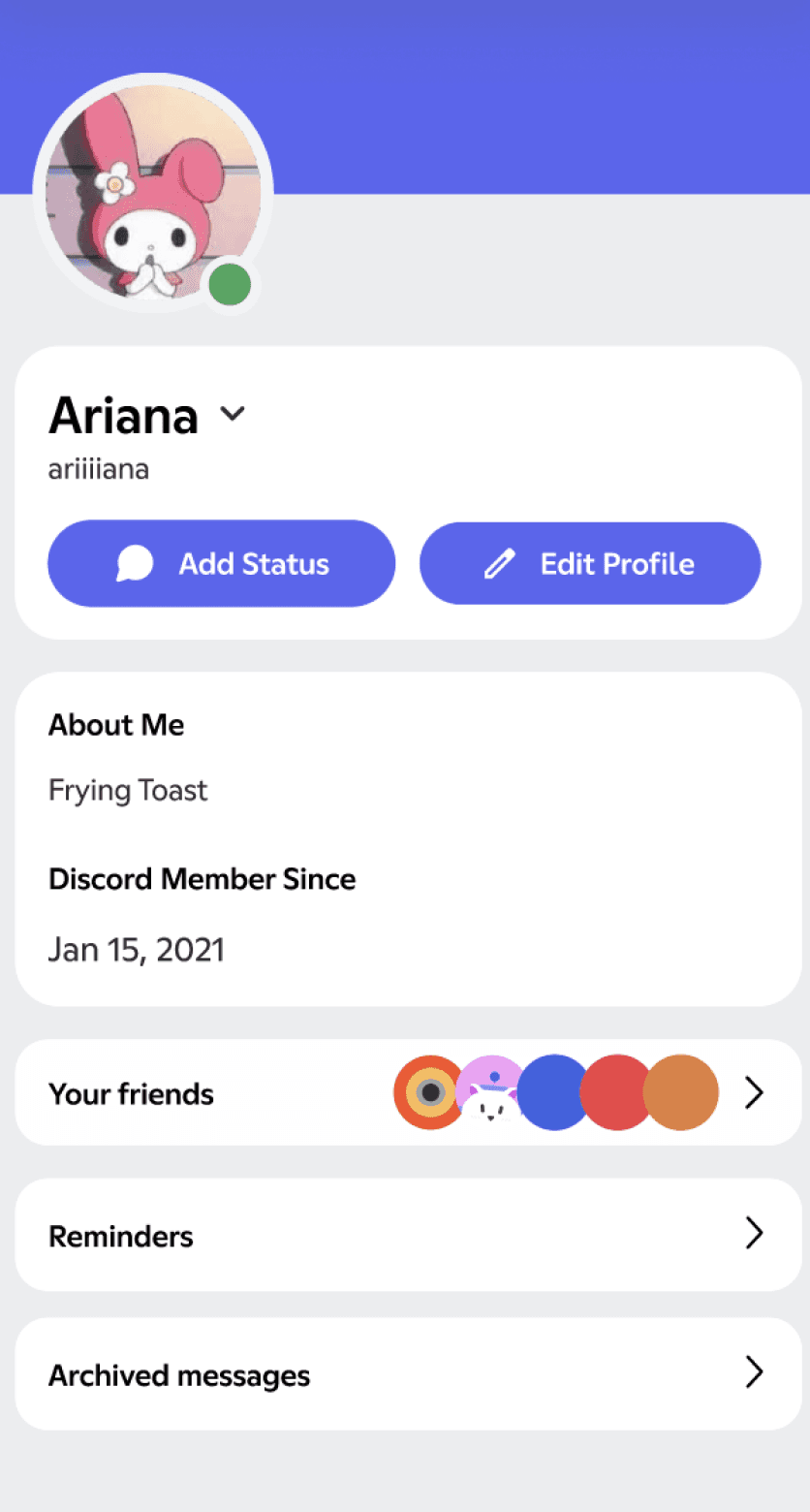

Archive & Remind actions can be accessed directly from chats and the notifications page integrated with systemized terminology to provide seamless navigation for the user.
Archived & Reminders pages can both be found through the users profile, matching the exact wording of placement.
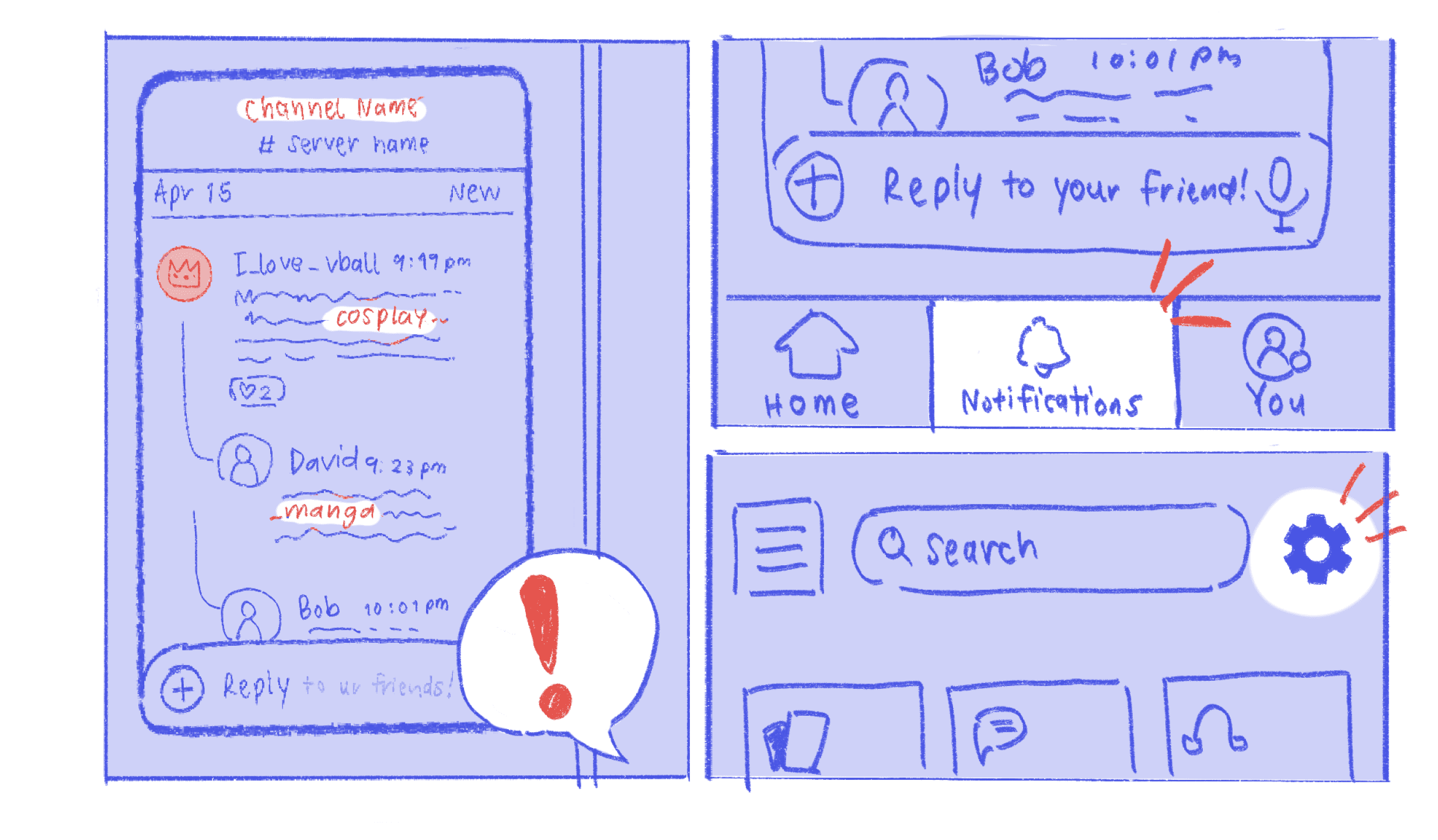
Storyboarding & Mapping
1 · Stepping away

2 · Coming back

3 · Catch up

4 · Refine & personalise


| Journey Mapping
Goal: Short-term Catch Up with ATD Fraternity
Scenario
Annie stepped away from Discord for a short period of time (1 hours to 3 days) to grind on her design project. She returns and wants to catch up with what she missed during these time.
EXPECTATIONS
• An organized homepage that is intuitive to navigate.
• A useful, fun catch-up flow with messages she’s interested in.
• A friendly pathway to rejoin community discussions.
INSIGHTS & OPPORTUNITIES
• Encourage comeback users to actively contribute to the community
1 · Step Away
ACTIONS
• Blocks distracting notifications with “Do Not Disturb”
• Glance at lock screen widget for activity summaries (e.g. 1 trending convo in #design)
FEELINGS
• Annoyed, irritated, FOMO
• Relieved, Calm
• Focused, Productive
IN HER WORDS
• “I enjoy chatting with my friends, but I really need to lock in…”
• “Discord’s phantom beeps are non-stop…”
• “Nice, Discord is keeping track of updates for me so I can unplug!”
• “Am I missing out the fun?”
OPPORTUNITIES
• Lock-screen widget display a glanceable, non-intrusive summary of system status.
2 · Catch Up
ACTIONS
• Browse AI-summarized cards of servers & channel activities
• Explore updates with Topic Filters (e.g. #Memes, #School)
• Tap to reveal message details and reply directly in card view
FEELINGS
• Relaxed
• Informed
• Reconnected
IN HER WORDS
• “ID students were chatting about Blender in this channel? Lemme read their convo…”
• “Great! I don’t need to scroll through 50 messages to get the tea… Plus a design meetup coming up?”
• “I’ve been away—I wanna quickly know what I missed.”
OPPORTUNITIES
• Regain context and reduce anxiety about missing out, confident boost before re-engaging with the community.
• Busy users want to skim important updates without diving in.
3 · Refine Feed
ACTIONS
• Swipe right/left = signal interested/not interested
• Swipe up/down = archive/keep message unread
• Manually adjust whitelist notif source in notification setting
FEELINGS
• Trust
• Ownership, clarity
• Confident, in control
IN HER WORDS
• “This @mention has important info—swipe down to save for later!”
• “I want to be notified more about Blender—add topic filter!”
• “Ugh, these’re THE servers that keeps spamming me with @channel—swipe up to mute! So satisfying to get rid of them all at once!”
OPPORTUNITIES
• Train the inbox (notification system) to reflect user interests.
• Swiping is a lightweight but powerful form of preference signaling.
4 · Rejoin Community
ACTIONS
• Tap into a message card to locate the original discussion
• Browse all active voice channels & live streams across servers in a centralized view
• Join live discussions
FEELINGS
• Energized
• Inspired & Curious
• Spontaneous fun
IN HER WORDS
• “Now that I’m caught up, I’m ready to jump back in!”
• “Capstone critiques happening in #design-roast? Lemme join them!”
• “Wait, what does this meme means? What’s the origin of this inside joke?”
OPPORTUNITIES
• Orient users to lower the content barrier for returning users.
• Encourage users to contribute to communities by reducing the friction of discovering discussions.
5 · Server History
ACTIONS
• Trace meme origin in server archive with AI-assisted search
• Read server Wiki about internal jargon in a simple UI
FEELINGS
• Satisfied
• Empowered
• Accepted, belong
IN HER WORDS
• “Ooh no need to ask, I just found it—that’s why everyone’s obsessed with breadstick!”
OPPORTUNITIES
• Create a centralized, live archive that turn chat histories into structured community knowledge for users to revisit & deep dive.
• Empower curious users with autonomy to explore without awkwardness.
| Empathy Mapping
Goal: Short-term Catch Up with ATD Fraternity — persona: Ariana
SAYS
• “It’s easy to turn the notifications off!”
• “Who messaged me?”
• “Where can I find the people I want to find?”
• “These messages are not that interesting”
• “Why notify me about irrelevant messages?”
• “I want to archive this.”
• “Let me check in with important updates!”
THINKS
• Information is easy to find
• The Do Not Disturb feature is convenient
• This is an easy way to catch up with the community
• The AI summarization is efficient
• The notification tab has some irrelevant information
• Learning about specific topics is seamless
DOES
• Navigates through notifications
• Catches up with servers
• Processes information
• Scrolling through relevant chat history
• Tries searching files
• Mutes certain servers/channels
• Engages with the ATD community
FEELS
• Like she belongs
• Worry-free
• In control (boss lady)
• Empowered
• Calm
• Accepted
• Engaged
• Satisfied
• Excited
• Flexible in multiple topics
• Secure
01) Intuitive Interaction
01) Intuitive Interaction
The immersive card swiping interface on slack mimics real-world gestures, removing unnecessary UI elements to reduce cognitive overload and improve information retention. Giving users flexibility through interactions, supporting different preferences and making available actions more recognizable.
The immersive card swiping interface on slack mimics real-world gestures, removing unnecessary UI elements to reduce cognitive overload and improve information retention. Giving users flexibility through interactions, supporting different preferences and making available actions more recognizable.
Notifications can be easily filtered out by categories such as “All,” “@Mentions,” “Threads,”and “Reactions,” with an “Unread” toggle placed conveniently for users to quickly access.
Notifications can be easily filtered out by categories such as “All,” “@Mentions,” “Threads,”and “Reactions,” with an “Unread” toggle placed conveniently for users to quickly access.
02) Notification Management, User Empowerment
02) Notification Management, User Empowerment

Discord’s flexibility and customization come at the cost of user clarity and consistency, leading to significant frustration, especially for new members.
Discord’s flexibility and customization come at the cost of user clarity and consistency, leading to significant frustration, especially for new members.
Whereas...
Whereas...
Visibility of System Status (Severity: 4)
Notifications are cluttered and lack clear sourcing. Users face limited control, missing essential features like categorical filtering, unread toggles, and the ability to archive or pin alerts.
Visibility of System Status (Severity: 4)
Notifications are cluttered and lack clear sourcing. Users face limited control, missing essential features like categorical filtering, unread toggles, and the ability to archive or pin alerts.
Slack
Slack
| Competitive Analysis
| Competitive Analysis
Users expressed interest in switching over to Slack. Offering similar content/functionality as Discord, however its features prioritize intuitive interaction, efficient notification management, and user empowerment.
Users expressed interest in switching over to Slack. Offering similar content/functionality as Discord, however its features prioritize intuitive interaction, efficient notification management, and user empowerment.

Flow-stock-outflow model inspired by System Thinking
Higher discoverability (under Profile), feels more permanent, centralized, and in-control.
Reminder stores short-term, time-sensitive tasks.
Archive stores long-term, non-urgent resources.
Long-scrolling of chat history since advanced search can be inaccessible for everyday users.
Friction–muting a channel from notification inbox requires 4 steps, too much evaluations.
Hierarchical navigation forces users to click into every server & every channel to stay updated.
Content-driven navigation and Slack-inspired card system reduces cognitive loads.
High-level AI summaries and active users highlight for Discord’s multi-server scale.
Blacklisting (mute) often leads to FOMO (Fear of Missing Out).
White-listing helps users track down contents they actually care about.
Keywords discover people with similar interests from forgotten servers.
Work Hard, Play Hard.
Notification Settings
Card Swiping Catch-up
Manage & Organize Messages
Notification Settings
Navigate Unread Messages
Notification Settings
Problem
In active Discord communities, members struggle with staying informed and connected–either feeling glued to servers or returning to overwhelming amount of unread after being away. The lack of effective catch-up tools, low-utility notification inbox, and back-and-force navigation leave students lost in missed context–leading to a gradual erosion of belonging.
User
Busy students who use Discord to stay connected with social and campus communities—seeking focus for schoolwork but overwhelmed constant information overload & FOMO.
Define
How might we normalize absence and make returning feel effortless—so members can unplug, focus on life, and rejoin the community without guilt or being overwhelmed?
Solution
Notification inbox re-designed to eliminate FOMO while honoring personal downtime.
Discord Redesign | SPR 2025
Yaya Zheng, Ruby Wu, Meiyao Li

Interest-based Notification Setting
Catch-up Cards (High-level)
Catch-up Cards (Low-level)
Archive & Reminders
!= Pinned Messages
Personal Library of Important Messages
Pinned messages are channel-specific, requiring advanced search to access in one place.
Manage Noise quickly with easier access to mute and notification setting.
Train preference to help Discord collect messages that matters the most.
Notification System
Inflow represents raw (chaotic) real-time notifications.
Stock, an intermediate zone where users decide what to act on, delay, or ignore.
Outflow are processed informations for future access.
Feedback–user interactions trains the system to prioritize/filter content in the future.
We structured Discord as an information pipeline to guide our design decisions.
Figma Prototype
Final Deliverable:
A Discord For All
Storyboarding & Mapping
Storyboarding & Mapping

When Mia turns on “Do Not Disturb”, her Discord status will automatically update as well.
When Mia turns on “Do Not Disturb”, her Discord status will automatically update as well.
Lock-screen widget displays notifications non-intrusively. Clicks the widget & navigates directly to the Notification page
Lock-screen widget displays notifications non-intrusively. Clicks the widget & navigates directly to the Notification page
Mia quickly catches up with three shortcut actions and filter her most recent un-reads through tags (e.g. @mentions).
Mia quickly catches up with three shortcut actions and filter her most recent un-reads through tags (e.g. @mentions).
Using the “Catch Up” feature, Mia entered a playful, intuitive, and immersive card-swiping interaction. For servers/channels she’s not interested in, she mutes them by swiping left. She can reply directly within the view or tap into channel.
Using the “Catch Up” feature, Mia entered a playful, intuitive, and immersive card-swiping interaction. For servers/channels she’s not interested in, she mutes them by swiping left. She can reply directly within the view or tap into channel.
Mia clicked the “Settings” tab that could be reached from the “Notification” inbox page.
Mia clicked the “Settings” tab that could be reached from the “Notification” inbox page.
During her next “Catch up”, the channels, users, and keywords that she chose appears more frequently & early.
During her next “Catch up”, the channels, users, and keywords that she chose appears more frequently & early.
In “Notification Settings”, she personalizes her notifications by selecting specific channels, users, and keywords she wants to prioritize to see more in the “Catch up”.
In “Notification Settings”, she personalizes her notifications by selecting specific channels, users, and keywords she wants to prioritize to see more in the “Catch up”.
Mia sees channels, username, and keywords that interest her. She wants to keep an eye on these and receive relevant notifications.
Mia sees channels, username, and keywords that interest her. She wants to keep an eye on these and receive relevant notifications.
After finals, Mia can’t wait to reconnect with her community on Discord. She is delighted to find a clear, smart notification center, no chaotic badges, no clicking into dozens of unread channels, and no endless scrolling.
After finals, Mia can’t wait to reconnect with her community on Discord. She is delighted to find a clear, smart notification center, no chaotic badges, no clicking into dozens of unread channels, and no endless scrolling.
Discord’s redesigned inbox helps Mia quickly grasp the context she missed out on while she was away, mentions from friends and trending discussions. She’s back into the conversation effortlessly, like she was never gone.
Discord’s redesigned inbox helps Mia quickly grasp the context she missed out on while she was away, mentions from friends and trending discussions. She’s back into the conversation effortlessly, like she was never gone.
Mia is freed from the fear of missing out or falling behind on important updates. With the confidence that she can easily stay in the loop, Mia is able to fully enjoy her personal time.
Mia is freed from the fear of missing out or falling behind on important updates. With the confidence that she can easily stay in the loop, Mia is able to fully enjoy her personal time.
Mia needs to focus, but her Discord friends are texting non-stop. The phantom beeps are driving her crazy.
Mia needs to focus, but her Discord friends are texting non-stop. The phantom beeps are driving her crazy.
Mia turns on the “Do Not Disturb” mode to block distractions. The silence is calming, but a worry lingers.
Mia turns on the “Do Not Disturb” mode to block distractions. The silence is calming, but a worry lingers.
Mia feels relieved when Discord’s lock screen widget reassures her it will help her catch up later. Showing notifications counts silently without making noises.
Mia feels relieved when Discord’s lock screen widget reassures her it will help her catch up later. Showing notifications counts silently without making noises.
Mia has unplugged from distractions and entered a flow state, making real progress on her final exam.
Mia has unplugged from distractions and entered a flow state, making real progress on her final exam.
| Journey Mapping
Goal: Short-term Catch Up with ATD Fraternity

| Empathy Mapping
Goal: Short-term Catch Up with ATD Fraternity

| Journey Mapping
Goal: Short-term Catch Up with ATD Fraternity
| Empathy Mapping
Goal: Short-term Catch Up with ATD Fraternity
Final Deliverable:
A Discord For All
Notification inbox re-designed to eliminate FOMO while honoring personal downtime.
Interest-based notification settings
Catch-up cards — high level
Catch-up cards — low level
Archive & Reminders
Personal library of saved messages
Figma Prototype